
The Krishak Bandhu Scheme is a revolutionary initiative by the West Bengal Government to provide financial assistance to farmers. To ensure transparency and convenience, beneficiaries can now check their Krishak Bandhu Status and Krishak Bandhu Payment Status online. This guide will walk you through everything you need to know about checking your status, understanding the scheme, and troubleshooting any issues.
What is the Krishak Bandhu Scheme?
The Krishak Bandhu Scheme provides financial aid to farmers in West Bengal. Key benefits include:
- Annual Financial Support: Farmers receive up to ₹10,000 per year for their agricultural activities.
- Life Insurance Coverage: Farmers or their family members are eligible for up to ₹2 lakh in case of accidental death.
To take advantage of these benefits, it is essential to track your Krishak Bandhu Status and ensure your payments are up to date.
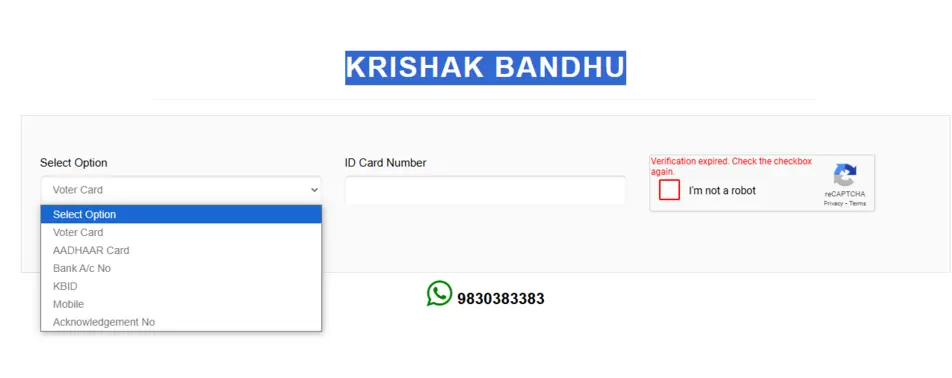
How to Check Krishak Bandhu Status Online?
Here’s how you can check your Krishak Bandhu Status using the latest portal interface:
Step 1: Visit the Official Website
- Go to the official Krishak Bandhu portal.
Step 2: Choose an Identification Option in Krishak Bandhu portal
- On the homepage, you will see a dropdown menu labeled “Select Option.”
- From the dropdown, choose one of the following identification options:
- Voter Card
- Aadhaar Card
- Bank Account Number
- KBID (Krishak Bandhu ID)
- Mobile Number
- Acknowledgement Number
Step 3: Enter Your ID Details
- After selecting the appropriate option, enter the corresponding ID Card Number or relevant information in the text box provided.
Step 4: Verify via reCAPTCHA
- Tick the “I’m not a robot” checkbox to complete the CAPTCHA verification.
- If the verification expires, reload the page and try again.
Step 5: Submit Your Details
- Click the “Submit” button to proceed.
- The portal will display your Krishak Bandhu Status, including your application progress, approval status, and payment updates.
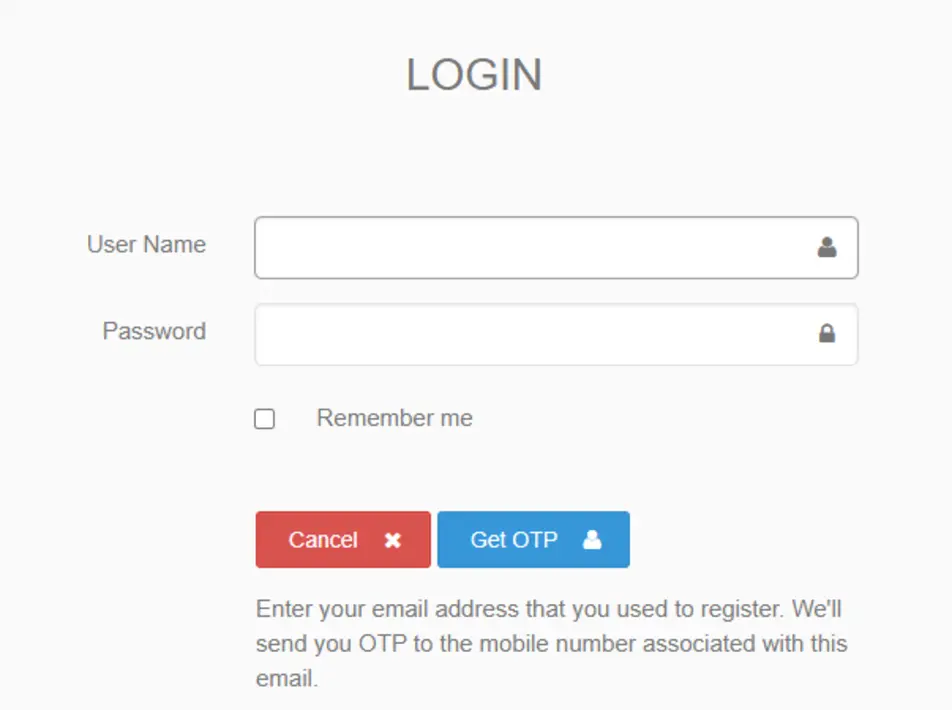
How to Check Krishak Bandhu Status of Payment ?
Step 1: Visit the Official Portal of Krishak Bandhu
- Open the official Krishak Bandhu website (krishakbandhu.wb.gov.in).
- Navigate to the login page.
Step 2: Krishak Bandhu Log in Using Your Credentials
- Enter your User Name in the designated field.
- Enter your Password in the Password field.
- Tick the “Remember me” option if you are using a personal device for easier future access.
- Click the “Get OTP” button to receive a One-Time Password (OTP) on your registered mobile number.
- Enter the OTP to complete the login process.
Step 3: Navigate to Krishak Bandhu Payment Status
- Once logged in, go to the “Payment Status“ section in the dashboard.
- Enter required details, such as your KBID (Krishak Bandhu ID), bank account number, or other relevant details.
- Click on “Submit” to view your payment status.
Need Help? Contact Support
If you face issues during the process, reach out to the Krishak Bandhu support team:
Direct Helpline Numbers
📞 8336957370
📞 6291720406
🕒 Available Time: 10 AM – 6 PM
Email for Queries
Feel free to contact them for issues related to login, payment, or application status.
firsthomeownergrants.com :- The First Home Owner Grant is a one-time government payment in Australia to help first-time buyers purchase or build a new home.